Deskworks allows you to select Multifactor Authentication, but it does not require this setting. If you want extra security for people logging into their Deskworks account, you may choose to use this feature.
To set up MFA:
- On the left sidebar, click SETUP > SETTINGS
- Under GENERAL, check the box for "Enable Multi-Factor Authentication
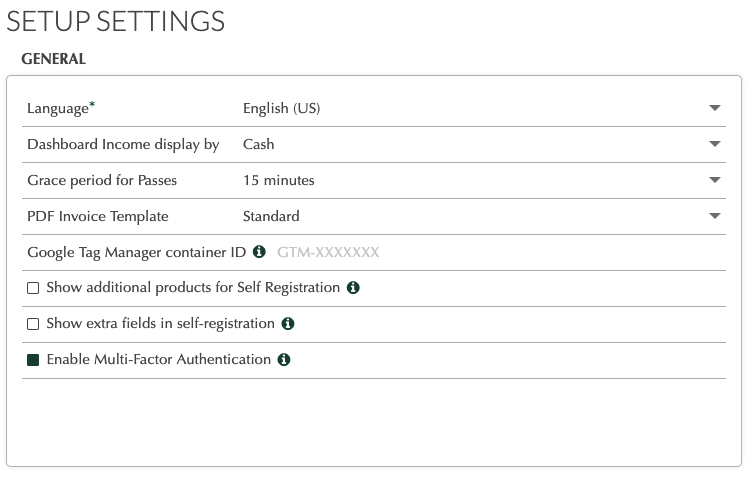
- Under GENERAL, check the box for "Enable Multi-Factor Authentication
- When a user attempts to login to your site, using their login and password, they will receive an email with a 6 digit code, asking them to enter the code on the Deskworks screen.
- Enter the code on the screen and click CONFIRM.
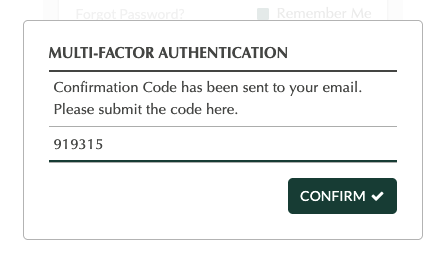
- That's it!
Notes:
- New users who self-registered within the last hour will not receive the MFA screen.
- If a Co-member has a login and password, but no email address entered, they will not receive the MFA screen.
- MFA is not required when creating a reservation on the Reservation Tablet App.
Was this article helpful?
That’s Great!
Thank you for your feedback
Sorry! We couldn't be helpful
Thank you for your feedback
Feedback sent
We appreciate your effort and will try to fix the article